
Incorporating into Databricks
Incorporating b.well Open Source FHIR SDK into Databricks
Install b.well Python Packages
As mentioned above, b.well python packages are provided as standard Python packages on PyPi.org.
To add them to your cluster, when you create a new cluster, you can add them as libraries.
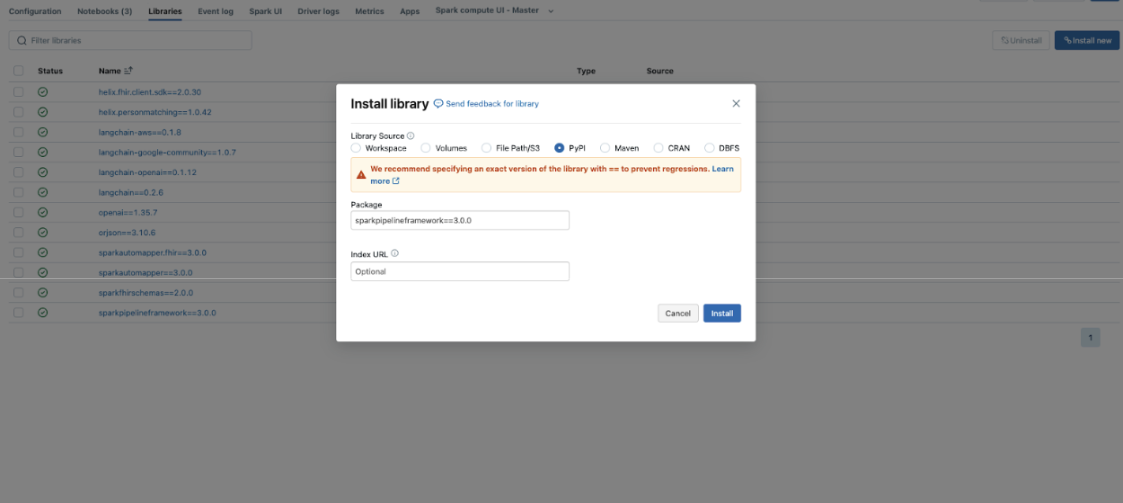
You can add all of the python packages you’re interested in using. We highly recommend you pin the version to the latest version at the time you test. While we make every effort to ensure backwards compatibility we recommend you test new versions before upgrading.
That’s it! The b.well SDK packages will now be available to any notebook or dashboard using this cluster.
For more information on installing Python Packages in Databricks, you can refer to their documentation: https://docs.databricks.com/en/libraries/cluster-libraries.html
Using b.well Open Source Packages in a Notebook
You can use b.well python packages just like any other python packages in your notebook code.
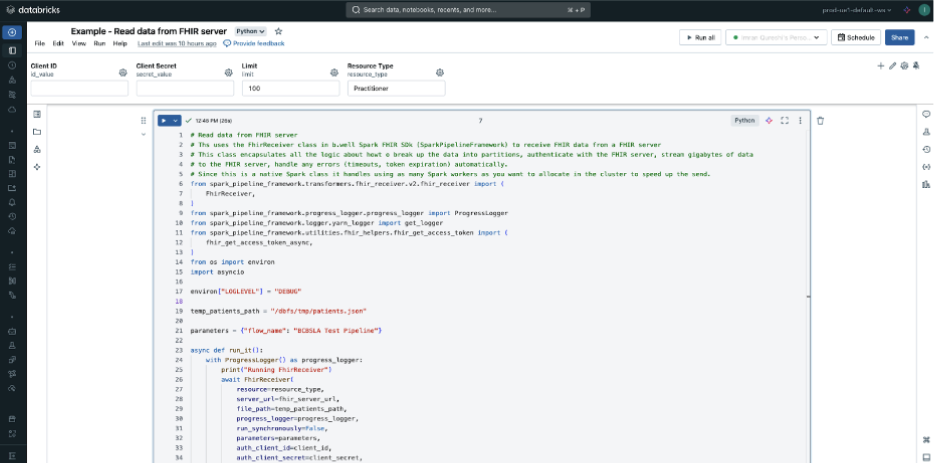
For example, to use the FhirReceiver that is part of the SparkPipelineFramework package, you can import the definition:
from spark_pipeline_framework.transformers.fhir_receiver.v2.fhir_receiver import (
   FhirReceiver,
)
And then run it:
with ProgressLogger() as progress_logger:
       print("Running FhirReceiver")
       FhirReceiver(
           resource=resource_type,
           server_url=fhir_server_url,
           file_path=temp_patients_path,
           progress_logger=progress_logger,
           run_synchronously=False,
           parameters=parameters,
           auth_client_id=client_id,
           auth_client_secret=client_secret,
           auth_well_known_url=auth_well_known_url,
           auth_scopes=auth_scopes,
           view="results_view",
           error_view="error_view",
           limit=limit,
           schema=schema,
           use_data_streaming=True,
           log_level="DEBUG",
       ).transform(df)
       print("Finished FhirReceiver")
Updated 10 months ago