
Unified Search Data Connections
Product Feature Overview: Unified Search Data Connections
Feature Overview
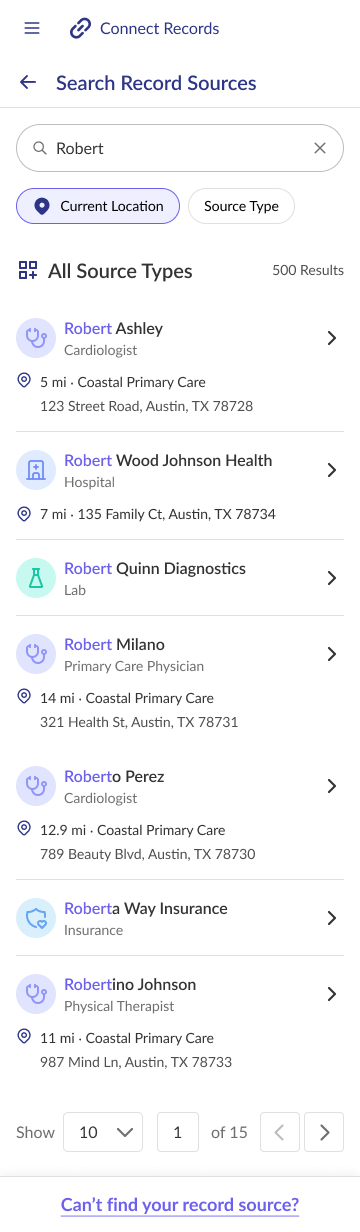
The Unified Search feature delivers a comprehensive, single-entry search interface, integrating the capabilities of searchConnections and searchProviders. This functionality allows users to efficiently search across various healthcare resource types, including practices, practitioners, laboratories, insurance providers, and pharmacies. By supporting source type filtering and location-based enhancements, Unified Search simplifies health information retrieval, making it accessible from diverse sources without requiring multiple, separate searches. Advanced search options, such as relevance and distance, tailored to each resource type, ensure search results are precise and relevant.
End User Value
The Unified Search feature streamlines the process of accessing health data by integrating multiple data sources into a single, user-friendly interface. Source filters and location-based enhancements, which offer additional convenience by providing geographically pertinent results, improve efficiency and accessibility of health information retrieval, catering to both broad and specific search needs.
User Journey(s) Enabled
Key user flows supported by this feature:
User Journey 1: Search data connections (default settings)
- The user accesses Health Records
- The user taps the search input
- The user enters a search term or terms
- The user views results in a vertical list, sorted by matching relevance first
- For providers, the following data is seen:
- Primary Specialty
- Location
- Distance From
- For facilities, the following data is seen:
- Name
- Location
- For laboratories, the following data is seen:
- Name
- For pharmacies, the following data is seen:
- Name
- For health plans, the following data is seen:
- Name
- For providers, the following data is seen:
User Journey 2: Search data connections (source filter)
- The user accesses Health Records
- The user taps the search input
- The user enters a search term or terms
- The user views results in a vertical list, sorted by matching relevance first
- User can filter results by source type:
- Providers
- Facilities
- Laboratories
- Pharmacies
- Health Plans/Insurance
User Journey 3: Search data connections (location boost)
- The user accesses Health Records
- The user taps the search input
- The user enters a search term or terms
- The user views results in a vertical list, sorted by matching relevance first
- User can enhance results with location:
- Enable current device location, OR
- Enter a specific location
- Distance from set location point displayed with each result (where applicable)
- Nearby matches receive relevancy boost while maintaining all matching results
Example UI Screens
Integration with SDK
The Unified Search feature is implemented through the searchHealthResources method.
Key Features:
- Single search interface supporting all resource types:
PRACTICE(hospitals, clinics, health systems)PRACTITIONER(healthcare providers)LABORATORY(laboratory connections)INSURANCE(insurance provider connections)PHARMACY(pharmacy connections)
- Location boost capability to enhance relevance of nearby results
- Source type filtering
- Pagination support
For detailed implementation instructions, refer to the searchHealthResources Method Guide
Updated about 2 months ago